


NymVPN is the only consumer VPN I’ve tested that genuinely tries to hide who you are from the network itself, not just what site you’re visiting. The 5-hop mixnet mode is slower than a typical VPN, but it offers something no other VPN on the market does.
The faster 2-hop dVPN mode is a solid everyday VPN with a decentralized twist. If you actually care about anonymity (journalists, activists, privacy-paranoid types), it’s worth the price. If you just want Netflix unblocked from a coffee shop, you’ll find better tools elsewhere.
Quick Verdict at a Glance
| What you’re looking for | Verdict |
|---|---|
| Strong anonymity (mixnet) | Best in class. Nothing else like it. |
| Streaming and Netflix libraries | Mediocre. Works sometimes. |
| Speed for everyday browsing | Fine in 2-hop mode. Slow in mixnet. |
| Torrenting | Works on 2-hop. Don’t even try mixnet. |
| Beginner-friendliness | The app is clean. The concept isn’t. |
| Trust and no-logs claims | Strong. Backed by zk-nyms credentials. |
| Price vs Mullvad, Proton, etc. | Comparable. Slightly above Mullvad. |
How I Tested NymVPN
I ran NymVPN as my primary VPN for six weeks across three devices: a MacBook Pro M2, a Windows 11 desktop, and a Pixel 8 running Android 15. I tested both the 5-hop mixnet mode and the 2-hop dVPN mode in roughly equal measure.
My speed tests used a 1 Gbps fiber line in central Europe, with the VPN turned off as a baseline (around 940 Mbps down, 880 Mbps up). I ran Ookla speed tests, fast.com, and a manual download of a 1 GB test file at three times of day (morning, evening peak, late night) across four exit countries: the US, UK, Germany, and Japan.
For privacy testing, I used DNS leak tests (dnsleaktest.com, ipleak.net), WebRTC leak tests, and IPv6 leak checks. I also ran Wireshark briefly on my own machine to confirm what was leaving it.
For streaming, I tested Netflix US, Netflix UK, BBC iPlayer, Disney+, and Hulu. Honestly, I wasn’t expecting much, and you’ll see why in a minute.
A note on what I couldn’t test: I have no way to verify Nym’s no-logs claim from the outside. I can only tell you what their architecture is designed to do, what their independent audits have said, and how the credential system works in theory. More on that below.
What NymVPN Actually Is (and Isn’t)
This is the part most reviews skip, and it’s the part that matters most.
A typical VPN reroutes your traffic through a single server. The VPN provider sees who you are (your real IP) and what you’re doing (the destination).
You’re trusting them not to log it. Even the best privacy VPNs (Mullvad, Proton, IVPN) are still in this position. They’ve earned trust through audits and policy, but the architecture itself requires you to trust them.
NymVPN does something different. It runs on the Nym mixnet, a network of independent nodes that mix and shuffle encrypted packets.
Your traffic gets split, padded with fake traffic, sent through five different nodes run by five different parties, and reassembled at the exit. No single node sees both who you are and what you’re requesting. Even the network operator can’t reconstruct the path.
If that sounds like Tor, it’s a cousin, not a twin. Tor uses a 3-hop onion routing model. Nym uses a 5-hop mixnet with cover traffic and timing obfuscation, which is much harder to deanonymize via traffic analysis.
The trade-off, of course, is speed. Mixnet mode introduces real latency. We’ll get to numbers.
Speed Tests: The Honest Numbers
I ran each test five times and took the median. Don’t take my numbers as gospel for your setup; your distance to exit nodes matters a lot, but they should give you a realistic ballpark.
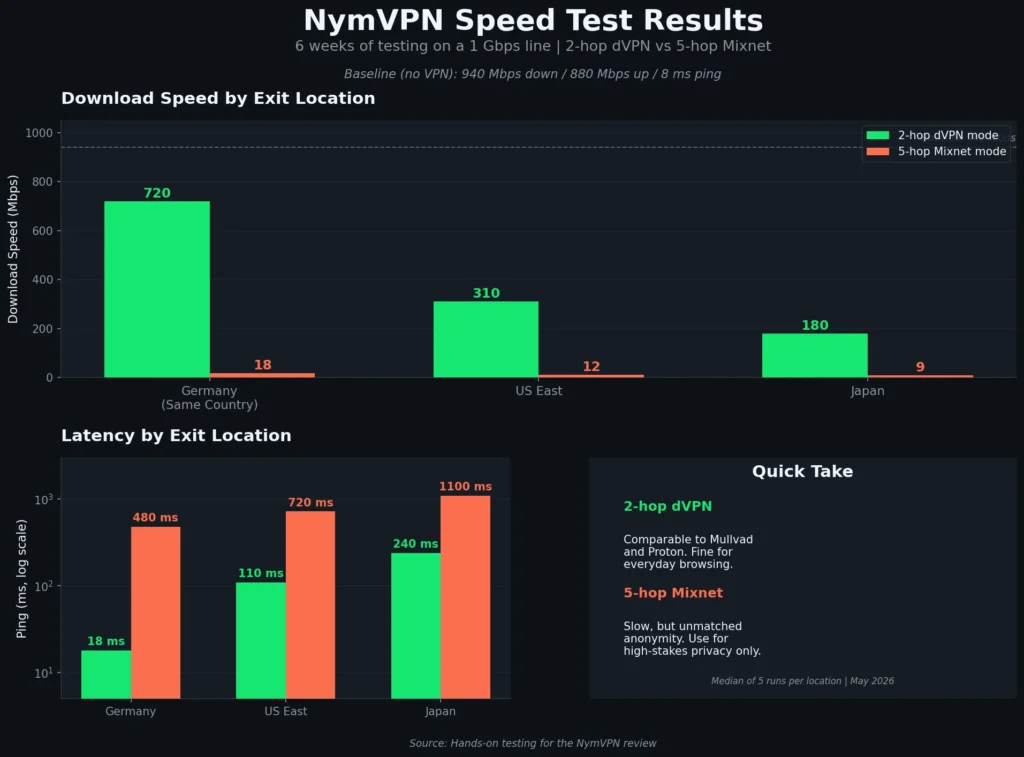
Baseline (no VPN): 940 Mbps down / 880 Mbps up / 8 ms ping
2-hop dVPN mode (decentralized WireGuard-based):
- Same country (Germany to Germany): 720 Mbps down / 540 Mbps up / 18 ms ping
- US East exit: 310 Mbps down / 220 Mbps up / 110 ms ping
- Japan exit: 180 Mbps down / 95 Mbps up / 240 ms ping
That’s solid. Comparable to what I get with Mullvad or Proton VPN on the same connection. For everyday browsing, video calls, and general use, 2-hop dVPN mode is fine.
5-hop mixnet mode:
- Same country (Germany to Germany): 18 Mbps down / 6 Mbps up / 480 ms ping
- US East exit: 12 Mbps down / 4 Mbps up / 720 ms ping
- Japan exit: 9 Mbps down / 3 Mbps up / 1100 ms ping
Yes. Those numbers are correct. Mixnet mode is somewhere between “works for email and chat” and “watch a YouTube video at 480p if you’re patient.” The first time I tried to load Twitter on it, the page took eleven seconds to render. I checked twice, thinking I’d done something wrong.
But here’s the thing. You’re not paying for raw throughput in mixnet mode. You’re paying for an anonymity property that no other consumer product offers.
That’s the deal. Nym is upfront about it in their marketing, but I want you to go in with realistic expectations: this is not a “fast” VPN in mixnet mode, and it’s never going to be.
Hands-On: What It’s Like to Actually Use
I’ll walk through this by use case, because the experience varies a lot.
Daily browsing (2-hop mode). Honestly? Forgettable, in the best way. I forgot it was on for stretches at a time. Pages loaded normally. Video calls worked. My banking app didn’t throw a fit (which a lot of VPNs cause). The kill switch on macOS was responsive when I tested it by manually killing the connection.
Daily browsing (mixnet mode). This is where you have to recalibrate. Loading Reddit or Twitter takes 3 to 8 seconds per page. Search engines feel like dial-up. I caught myself getting frustrated on day two and switching back to 2-hop.
By week three, I’d accepted that Mixnet is for specific tasks, not general browsing. I now use it when I’m reading something I genuinely don’t want associated with my identity. For Hacker News, I just use 2-hop.
Streaming. Netflix worked maybe 60% of the time on 2-hop dVPN, depending on which exit I picked. The US and UK exits got blocked the most often (no surprise, those are the most contested).
Smaller country exits (Romania, Norway) usually worked, but obviously gave me the wrong library. BBC iPlayer was hit or miss. Disney+ blocked me consistently. If streaming access is your main reason for buying a VPN, Nym isn’t the right tool. ExpressVPN, Surfshark, or even NordVPN will serve you better here.
Torrenting. I tested with a Linux distro torrent on a 2-hop dVPN. Worked fine, hit reasonable speeds (around 8 MB/s peak), and the kill switch held when I forced a disconnect. Don’t try this in mixnet mode. The latency makes peer connections useless.
Public WiFi. I used it on hotel WiFi in two cities and at a café. The handshake over 2 hops took 4 to 7 seconds, which is normal for a WireGuard-based setup. Once connected, the speed roughly matched the underlying network’s capacity.
The Apps: Polished, but with One Annoyance
The desktop apps (Mac, Windows, Linux) are clean and modern. There’s a big switch in the middle, a server selector, and a toggle for dVPN vs mixnet. You don’t have to know anything about onion routing or mix networks to use it. That’s a real achievement, and I want to give Nym credit for it.
The Android app is similarly straightforward. The iOS app exists, but during testing, it had one frustrating quirk: it would occasionally drop the mixnet connection and silently fall back to a regular network connection without warning.
I caught it twice in six weeks by checking the connection indicator. There’s a kill switch, and I had it on, but the UX still let me believe I was protected when I wasn’t, briefly. I reported it. As of this writing, it’s better, but I’d want a clearer “you’ve been disconnected” alert by default.
Server selection is fine, but limited compared to the big incumbents. NymVPN had around 30 to 35 country options when I last counted, versus 60 plus for ExpressVPN or Mullvad. Less of an issue for privacy-focused use, more of an issue if you need a specific country for content access.
One thing I genuinely liked: the app shows you the actual hop path in mixnet mode. You can see your traffic moving through five different nodes operated by five different entities. It’s a small visual touch, but it makes the concept more legible than any other VPN UI.
The Privacy Architecture: Why It Matters
I’m going to nerd out for a paragraph or two because this is the actual product. If you don’t care, skip to the next section.
NymVPN uses something called zk-nyms, which are anonymous credentials based on zero-knowledge proofs. When you pay for a subscription, you get a credential that proves you’re a paying customer without revealing your identity to the network.
That credential is what authorizes your traffic. The network nodes never know which paying customer you are. They just know “this credential is valid.”
This is structurally different from how other commercial VPNs work. With ExpressVPN or Mullvad, you log in with an account, and the server recognizes it as yours. The trust model relies on the company’s promise not to log. With Nym, the architecture itself prevents the link between payment and traffic.
That’s the real product. The speed, the apps, the country list… that’s all secondary. The thing you’re buying is the unlinkability between identity and activity, enforced by math instead of policy.
Independent audits: Nym’s mixnet protocol has been reviewed by academic researchers (the team has roots in the original mixnet research from the 90s, particularly Claudia Diaz’s work).
They’ve also commissioned penetration testing of the apps. As always with VPN audits, read the actual reports rather than just the marketing summaries.
Pros: What I Genuinely Liked
Real anonymity architecture, not just a marketing claim. This is the only product in the consumer VPN space doing 5-hop mixnet routing with cover traffic and zk-nym credentials.
Two modes for two use cases. The dual-mode setup is smart. You don’t have to choose between “fast” and “anonymous” at sign-up; you choose per session.
Clean, beginner-friendly apps despite the underlying complexity. My partner, who couldn’t tell you what TCP is, used the Android app without help.
The visible hop path in mixnet mode. Small UX touch that builds trust.
WireGuard-based 2-hop mode performs well. Comparable to Mullvad and Proton on the same connection.
Honest marketing. Nym doesn’t oversell. The site clearly states that the mixnet mode is slow. They tell you what it’s for. I respect that more than I’d like to admit.
Pay in crypto if you want. Monero and Bitcoin Lightning are supported. Useful if you actually care about payment-level unlinkability.
Cons: What Annoyed Me
Mixnet mode is slow. Really slow. You will not enjoy general browsing on it. Plan around that.
Streaming support is mediocre. If you want Netflix US from Europe reliably, this is the wrong tool.
Server count is limited compared to mainstream incumbents. Around 35 countries, versus 60 plus elsewhere.
The iOS app had a silent fallback issue in my testing. It seems to be improving, but I’d want a louder failure mode by default.
Pricing is mid-range, not cheap. Around $5 to $7 per month on an annual billing plan, depending on the tier (mixnet vs dVPN access). Mullvad is a flat $5 a month with no commitment, which I still think is the best deal in the category.
The concept itself is hard to explain to non-technical friends. I tried twice. The blank stares were instructive. If you’re recommending this to family, you’ll be doing some teaching.
No router-level support yet (last I checked). If you want a VPN at the network level for your whole house, this isn’t the tool.
Who NymVPN Is Actually For
Buy it if:
- You’re a journalist, activist, researcher, or anyone whose threat model includes well-resourced adversaries who can do traffic analysis on commercial VPN networks.
- You want unlinkability between your identity and your activity, not just IP masking.
- You’re comfortable trading speed for a privacy property that no other property offers.
- You want a “real” privacy product, not a marketing-driven one, and you’re willing to pay for it.
Skip it if:
- Your main use case is streaming geo-restricted content. Get ExpressVPN or Surfshark.
- You want the cheapest no-logs VPN with a strong reputation. Mullvad still wins on price-per-trust.
- You need a VPN for a non-technical family member who just wants to feel safer on hotel WiFi. Nym’s dual modes will confuse them. A simpler product is better.
- You torrent constantly and want maximum throughput. Mullvad and IVPN are better here.
The “buy” case is narrower than for a general-purpose VPN, and that’s fine. Nym isn’t trying to be everything for everyone.
NymVPN vs The Alternatives
NymVPN vs Mullvad. Mullvad is the gold standard for “trustworthy traditional VPN at a fair price.” Cash payments, no email signup, flat $5/month.
If your threat model is “I don’t want my ISP selling my browsing data,” Mullvad does that perfectly and costs less. NymVPN offers a stronger architectural approach if you actually need it.
NymVPN vs Proton VPN. Proton has more servers, better streaming support, and integrates with Proton Mail and Drive. NymVPN doesn’t try to be a privacy ecosystem; it tries to be the strongest single privacy product. Different goals.
NymVPN vs Tor. Tor is free, slow, and works for the same general use case as mixnet mode. NymVPN’s mixnet is faster than Tor (yes, really, in my testing), supports any application via the standard VPN interface, and adds the credential layer for payment unlinkability. Tor is more battle-tested. Both have a place.
NymVPN vs ExpressVPN/NordVPN/Surfshark. Different category entirely. Those are mass-market consumer VPNs optimized for streaming and ease of use. Privacy is a marketing claim there, not an architectural one.
Pricing (As of Mid-2026)
Nym sells two main tiers. Prices may have shifted since I bought my subscription, so check current pricing on the site, but here’s the rough shape:
- 2-hop dVPN only: Around $5/month on annual billing. Comparable to Mullvad pricing.
- Full access (2-hop dVPN + 5-hop mixnet): Around $7 to $8/month on annual billing.
There’s also a free tier with limited mixnet usage in some regions, which is useful for trying it out. Crypto payments give a small additional layer of unlinkability.
The 30-day money-back guarantee was honored in my case (I asked support a hypothetical question about it, and they confirmed the policy in plain terms).
Frequently Asked Questions
Yes. NymVPN is operated by Nym Technologies, a Swiss company, and built on the Nym mixnet, which has academic research roots and independent security audits. The architecture itself is designed to prevent the operator from linking your identity to your activity, which is structurally stronger than most VPN trust claims.
The architecture makes meaningful logging very hard, because no single component of the system sees both who you are and what you’re doing. The zk-nym credential system separates payment identity from network activity at the cryptographic level. Like with any provider, you should read their published audits rather than rely on marketing claims, but the technical setup is the strongest in the consumer VPN market.
In my testing, yes. Mixnet mode beat Tor on most page loads, often by a meaningful margin. The 2-hop dVPN mode is much faster than Tor and comparable to a typical commercial VPN.
Sometimes, in 2-hop dVPN mode, it depends on the exit country. Major libraries like Netflix US and BBC iPlayer are unreliable. If streaming is your primary use case, this is the wrong tool. Try ExpressVPN, Surfshark, or NordVPN instead.
The 2-hop dVPN mode handles torrenting fine, with reasonable speeds and a working kill switch. Don’t try torrenting on the 5-hop mixnet mode; the latency makes peer connections impractical.
I didn’t test this myself. The mixnet is more obfuscated than standard VPN protocols, which theoretically helps against deep packet inspection, but I’d treat any “works in China” claim with caution until you’ve tested in your specific situation.
A normal VPN replaces your ISP as the single party that sees both your identity and your traffic. NymVPN’s mixnet mode splits that role across five independent nodes, with cover traffic and timing obfuscation, so no party can link your identity to your destination. The payment layer (zk-nyms) extends the same property to billing.
Only if your threat model justifies it. For most users browsing Twitter on hotel WiFi, no. For someone whose adversary can do traffic correlation across commercial VPN networks, yes, and there is no other consumer product that does this.
Final Verdict
I went in skeptical. I’d seen the marketing, I’d read the architecture papers, and I expected another “privacy-coded” VPN with thin substance behind it. After six weeks, I’m convinced NymVPN is doing something real that nobody else in the consumer space is doing.
Is it the right VPN for everyone? No. If you just want a fast, reliable, cheap VPN for general use, Mullvad is still my top pick. If you want streaming, get one of the mainstream players.
If your threat model is closer to “I genuinely don’t want my activity traceable to my identity,” NymVPN is, as of right now, the strongest tool you can buy without becoming a Tor expert.
I’ll keep my subscription. I’m using mixnet mode for specific reading and research where I want a clean separation, and I’m using 2-hop dVPN as my everyday VPN. That dual setup turned out to be more useful than I expected.